Google Drive has emerged as the preferred storage option for everything from important business documents to family photos and scholarly research in today’s digital-first society. Users frequently have to transfer this data between accounts, though. The question still stands: How can you transfer Google Drive to another account without having to deal with the inconvenience of manually downloading and re-uploading files, whether you’re graduating and losing access to a school email, changing jobs, or just combining several personal accounts to maximize your 15GB free storage limit?
Enter MultCloud, a robust web-based cloud management service that has revolutionized how we handle cross-platform data. In this review, we’ll explore why MultCloud is the premier choice for Google Drive migration and provide a detailed guide on how to use it effectively.
The Challenge of Manual Migration
Transferring files between Google Drive accounts using the conventional manner is infamously time-consuming. Usually, you have to spend hours or days re-uploading hundreds of terabytes to a new account after downloading them to your local hard drive. In addition to taking a long time, this procedure significantly depends on your local storage space and internet bandwidth. Additionally, manual transfers frequently remove folder structures and file metadata, leaving you with a disjointed mess.
Why MultCloud?
MultCloud serves as a “bridge” between different cloud services. It allows for direct cloud-to-cloud transfer, meaning the data moves directly from Google’s servers to the other account’s servers without ever passing through your computer.
Key Features of MultCloud:
- ✨Direct Transfer: During the process, neither local storage nor bandwidth are used.
- ✨Offline Migration: MultCloud takes care of the remainder in the background, so you may shut down your browser or turn off your computer once a transfer has begun.
- ✨Support for 40+ Clouds: OneDrive, Dropbox, MEGA, SharePoint, and more are supported in addition to Google Drive.
- ✨Security: MultCloud is GDPR compliant and employs 256-bit AES encryption for SSL, guaranteeing the security of your authorization tokens and data.
Step-by-Step Guide: How to Transfer Google Drive to Another Account
Using MultCloud is remarkably straightforward. Follow these steps to migrate your data seamlessly:
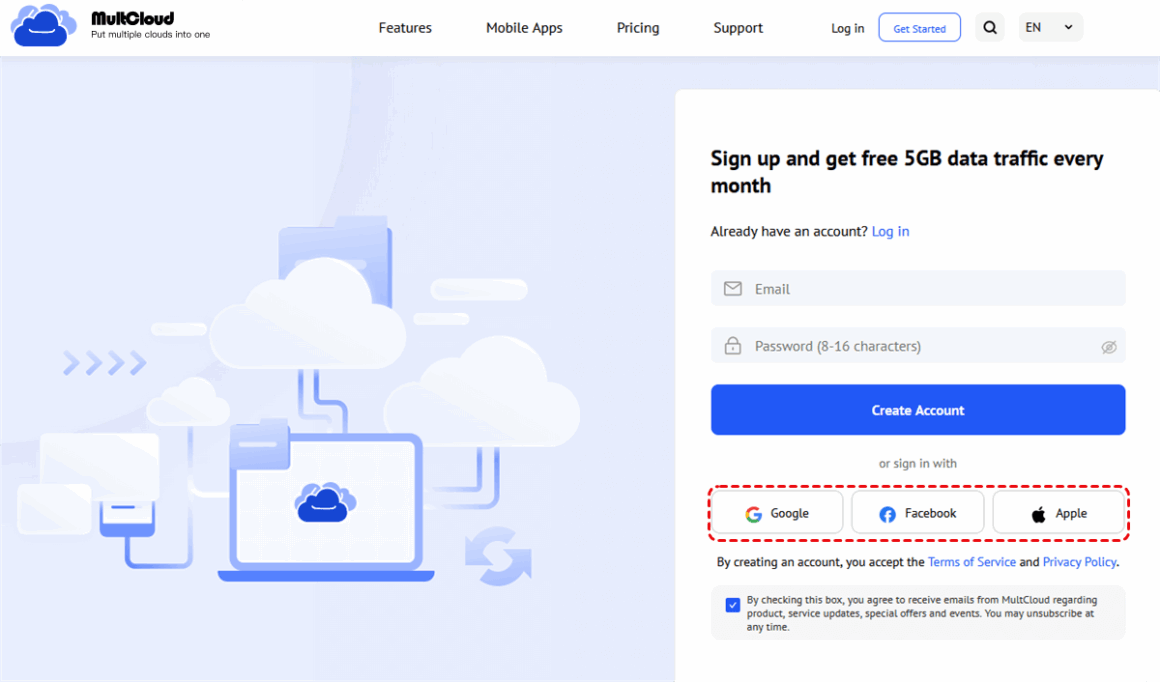
Step 1: Create a MultCloud Account
Visit the MultCloud website and sign up for a free account. You can also sign in quickly using your Google or Facebook credentials.
Step 2: Add Your Google Drive Accounts
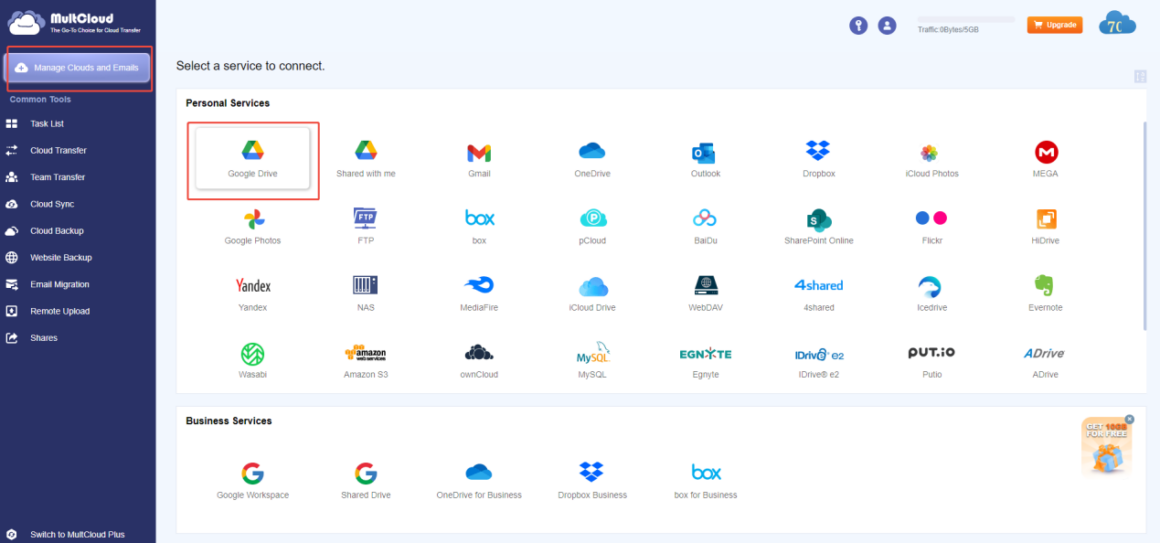
Once logged in, look at the left-hand sidebar and click “Manage Clouds and Emails.” Select the Google Drive icon. Follow the OAuth prompts to authorize MultCloud to access your first account. Repeat this process for your second Google Drive account. You can rename them (e.g., “Personal Drive” and “Work Drive”) to avoid confusion.
Step 3: Configure the Cloud Transfer Task
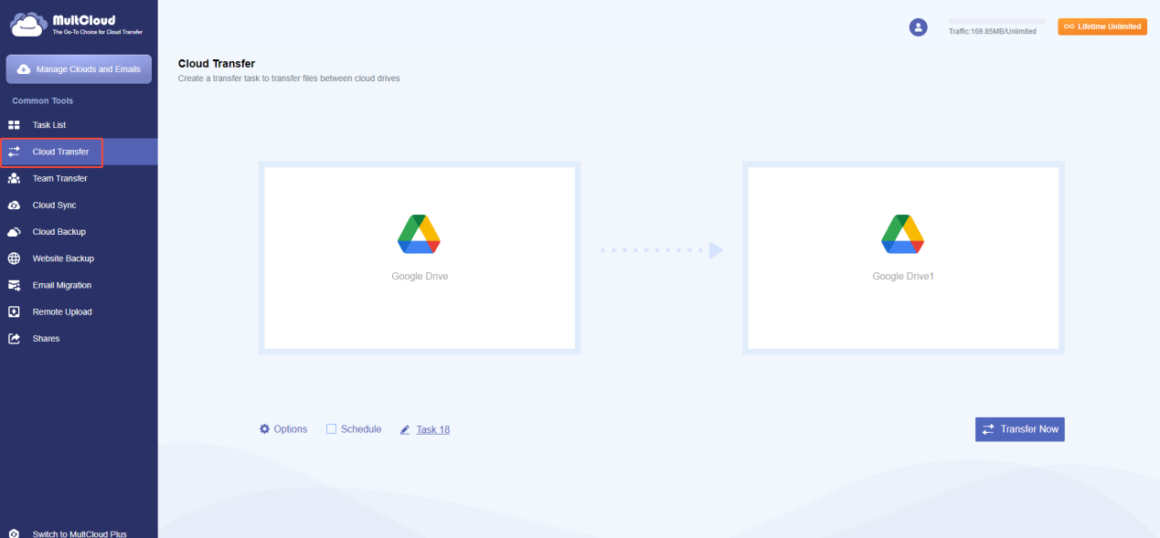
Click on the “Cloud Transfer” tab. You will see two boxes:
- Source: Select the files or the entire Google Drive from your original account.
- Destination: Select the target folder in your new Google Drive account.
Step 4: Options and Execution
Before hitting “Transfer Now,” you can click “Options” to set specific preferences, such as:
- Filter: Skip specific file types (e.g., skip all .temp files).
- Email Notification: Receive an alert once the migration is finished.
- Overwrite Settings: Decide what to do if a file with the same name already exists in the destination.
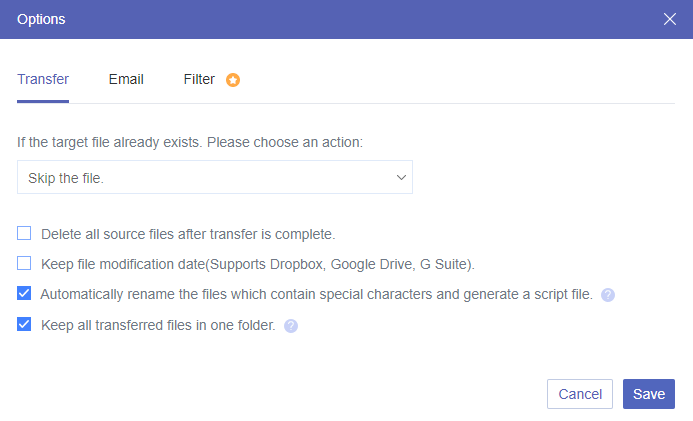
Finally, click “Transfer Now.” You can monitor the progress in the “Task List” tab.
Pricing and Performance
MultCloud offers a Free Plan that includes 5GB to 10GB of data traffic per month (depending on current promotions), which is perfect for small transfers. For users with massive libraries, their paid plans are quite competitive. As of 2026, monthly plans for higher traffic limits start around $19.90, with yearly “Unlimited” plans offering the best value for power users and businesses.
In terms of performance, MultCloud utilizes high-speed servers. While the exact speed depends on the APIs of the cloud providers (Google, in this case), it is consistently faster than a home-based upload/download cycle.
Pros and Cons
|
Pros |
|
|
Cons |
|
Final Verdict
MultCloud is unquestionably the best option if you’re searching for the fastest way to move Google Drive to a different account. It eliminates the technical difficulties associated with data migration, reducing a potentially multi-day task to a few easy clicks. It is a crucial tool for managing the contemporary cloud ecology for professionals, students, and digital hoarders alike. MultCloud offers the dependability and speed that manual techniques just cannot match, whether you’re moving 10GB or 10TB.